Say your website gets 10,000 sessions per week. Out of these, 4,000 are single-page sessions where visitors land on a blog post or landing page, read the content, and leave without clicking further. Bounce Rate = 4,000 / 10,000 = 40%. That means 40% of visitors left after viewing just one page. Whether that's a problem depends on the page's purpose.
Website Bounce Rate
Last updated: Jul 07, 2026
What is Website Bounce Rate?
Website Bounce Rate measures the percentage of sessions where a visitor views only one page and leaves without further interaction. A single-page session ends when a user closes the browser, clicks an outbound link, hits the back button, or lets the session time out. Bounce rate signals content relevance, page experience quality, and traffic-to-intent match.
Alternate names: Bounce RateWebsite Bounce Rate Formula
ƒ Count(Single-Page Sessions
Description: A session is a group of user interactions with a website that occur within a defined timeframe. Analytics platforms define a session as a period of continuous engagement that begins when a user arrives and ends after 30 minutes of inactivity or when the user leaves. Each session can contain multiple interactions, including page views, events, downloads, form submissions, and e-commerce transactions. Sessions are fundamental to understanding user behaviour patterns and website performance, capturing the complete journey a user takes during a single visit.
) / Count(SessionsDescription: A session is a group of user interactions with a website that occur within a defined timeframe. Analytics platforms define a session as a period of continuous engagement that begins when a user arrives and ends after 30 minutes of inactivity or when the user leaves. Each session can contain multiple interactions, including page views, events, downloads, form submissions, and e-commerce transactions. Sessions are fundamental to understanding user behaviour patterns and website performance, capturing the complete journey a user takes during a single visit.
)How to calculate Website Bounce Rate
Start tracking your Website Bounce Rate data
Use PowerMetrics, modern analytics platform, to monitor your data. Choose a service below to start tracking your Website Bounce Rate instantly.

What is a good Website Bounce Rate benchmark?
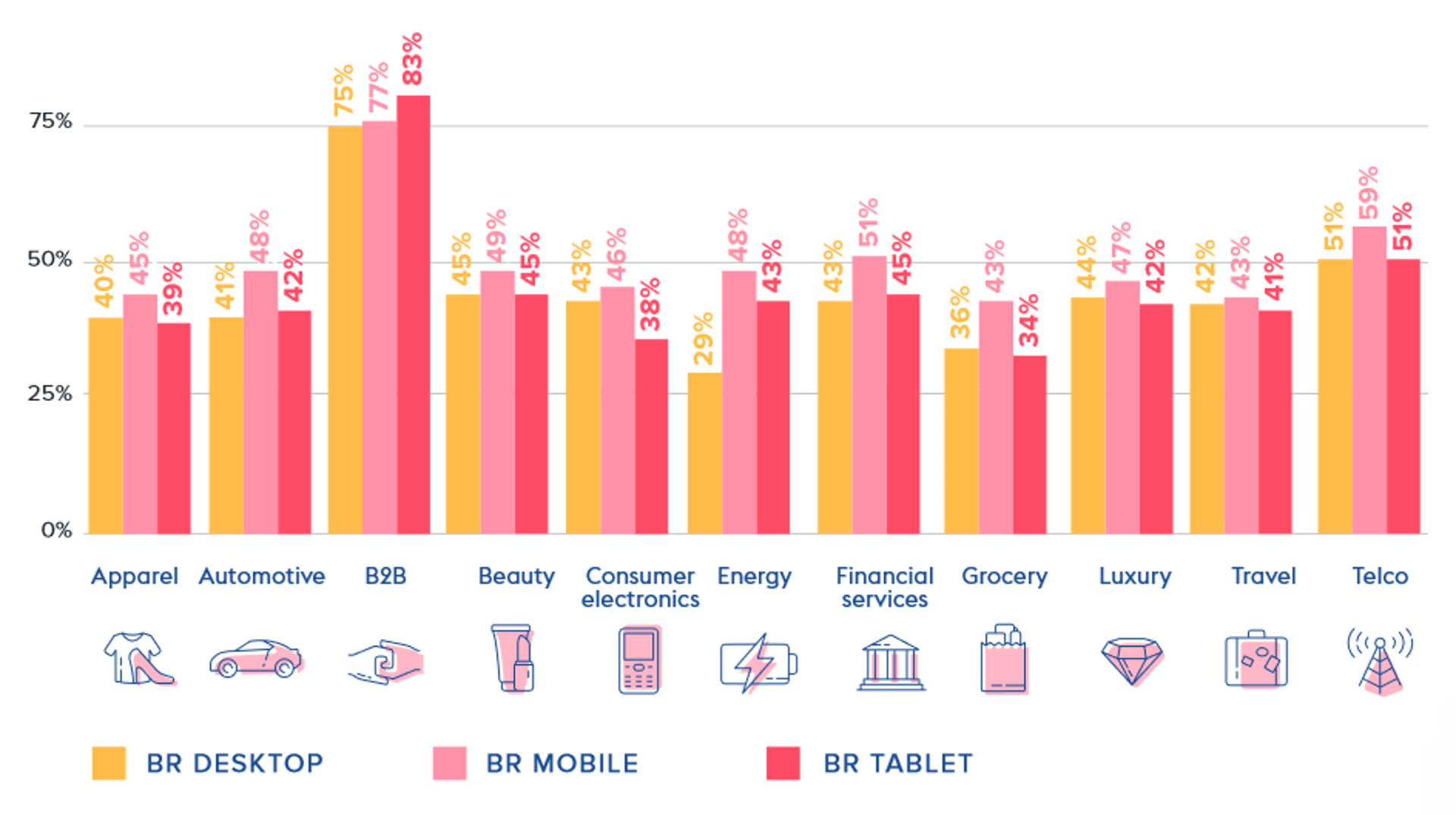
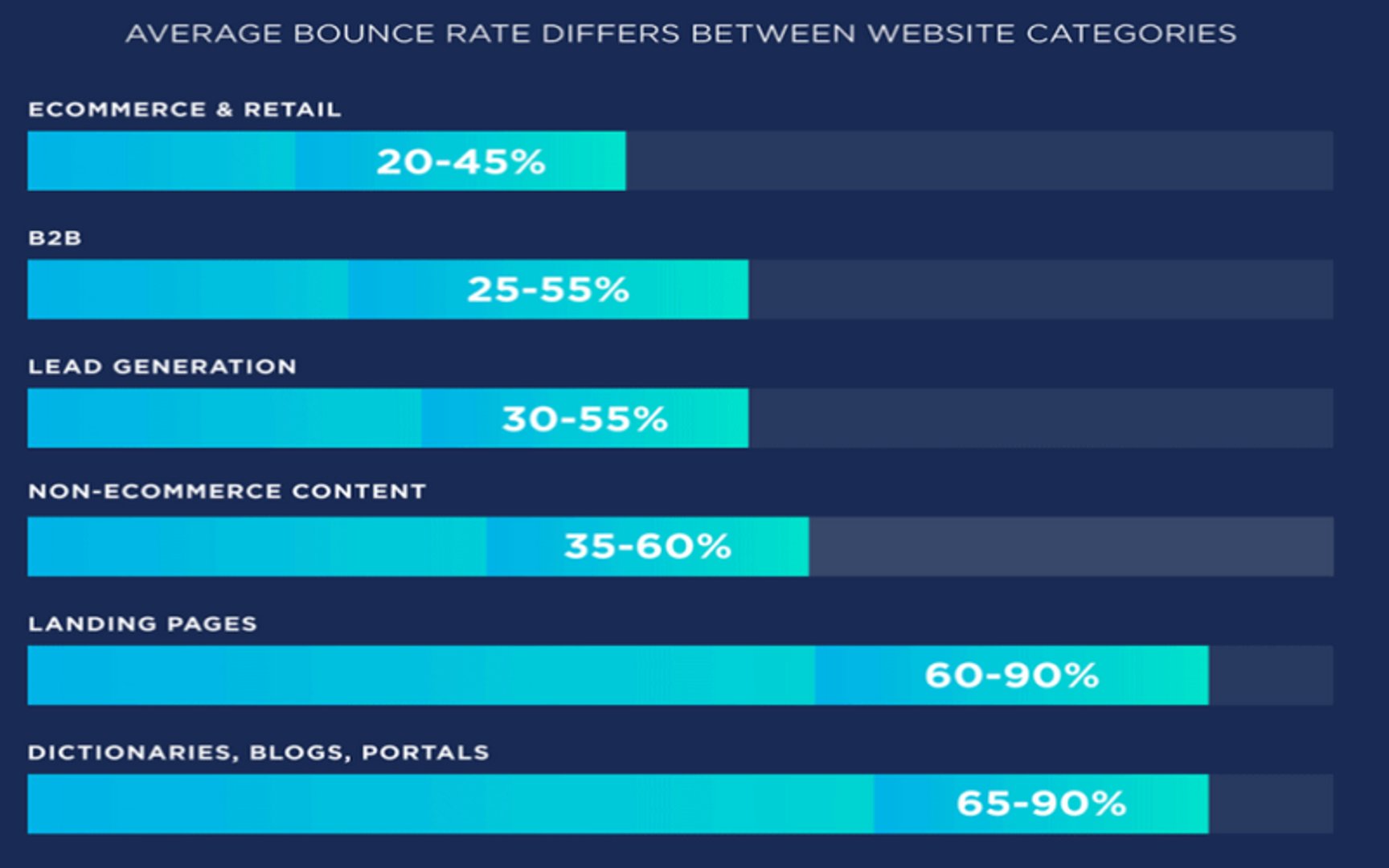
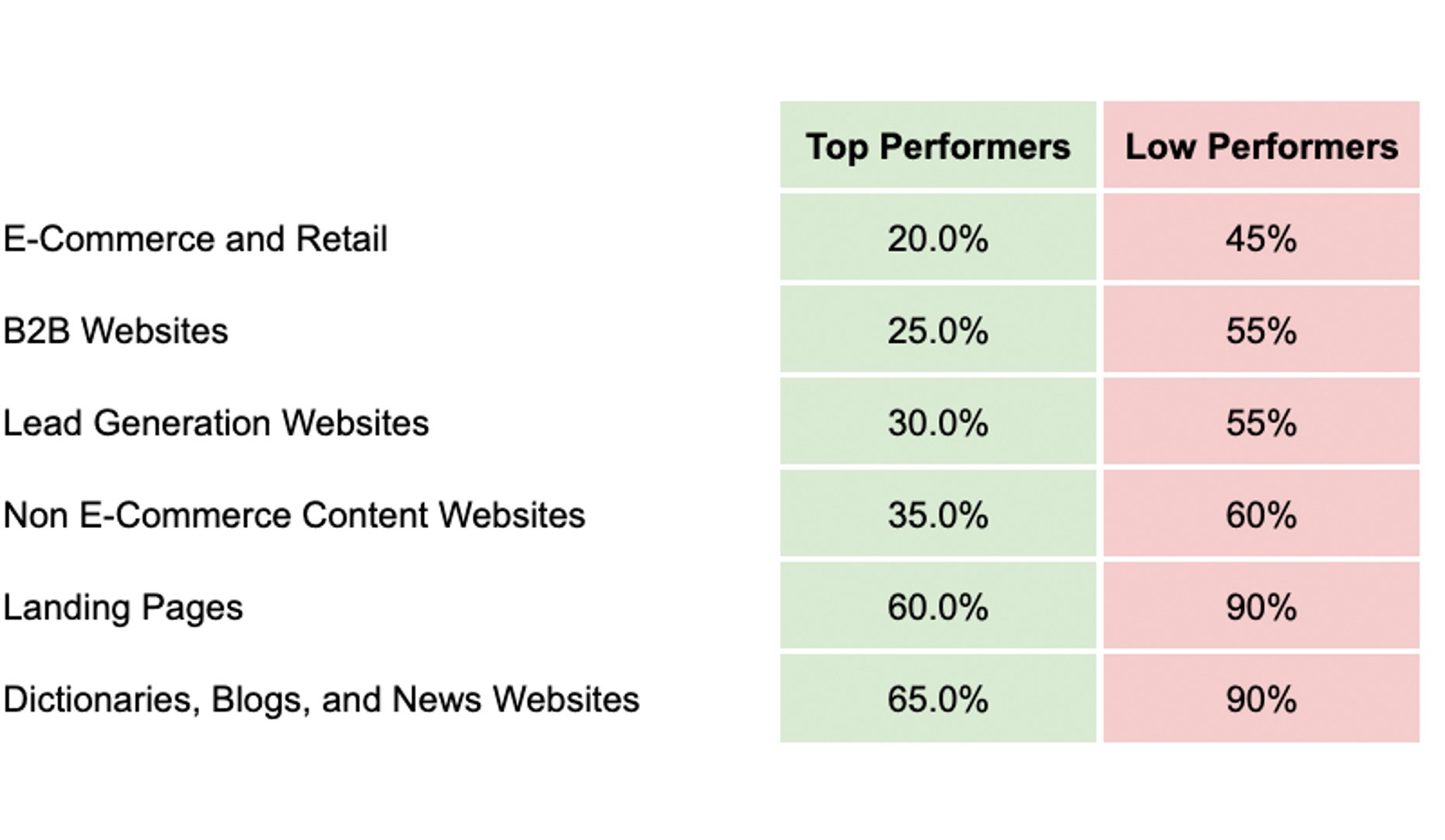
Bounce rate varies by industry, page type, and traffic source. Typical ranges: all industries average 40–60%; B2B websites 55–75%; e-commerce 45–65%; blogs and editorial content 65–90%; campaign landing pages 60–90%; service and SaaS sites 40–60%. Mobile traffic consistently bounces at higher rates than desktop across all categories.
Sources: Contentsquare Digital Experience Benchmark 2024; Semrush State of Content Marketing 2023.
Website Bounce Rate benchmarks
Bounce Rate Benchmark by Industry and Device Type

Bounce Rate by Website Category

Website Bounce Rate by Category


How to visualize Website Bounce Rate?
To visualize your website bounce rate data, it is best to use either a line chart to view fluctuations over time, or a summary chart to view the current value and compare it with a previous time period. For bounce rate, weekly comparisons are helpful if you've recently made website optimization changes that you expect will improve the user experience.
Website Bounce Rate visualization examples
Website Bounce Rate

Line Chart
Here's an example of how to visualize your Website Bounce Rate data in a line chart over time.
Summary Chart
Here's an example of how to visualize your current Website Bounce Rate data in comparison to a previous time period or date range.
Website Bounce Rate
Chart
Measuring Website Bounce RateMore about Website Bounce Rate
What affects bounce rate
Several factors drive bounce rate up or down:
- Page relevance: If a visitor's expectation (set by an ad, search result, or social post) doesn't match what they land on, they leave.
- Page speed: Slow load times increase abandonment before the page even renders.
- Mobile experience: Poorly formatted pages on mobile push bounce rates higher across nearly every industry.
- Content depth: Thin or low-quality content gives visitors no reason to stay.
- Single-purpose pages: Campaign landing pages, contact pages, and dictionary-style entries are designed for one interaction. High bounce rates on these pages are expected and acceptable.
How to use bounce rate effectively
Bounce rate is most useful when segmented. Looking at a site-wide average obscures what's actually happening.
Segment by page type. A 75% bounce rate on a blog post is unremarkable. The same rate on a pricing page warrants investigation.
Segment by traffic source. Paid traffic from broad keyword targeting often bounces more than branded organic search. Comparing channels helps you allocate budget more accurately.
Segment by device. If mobile bounce rate is significantly higher than desktop, the issue is likely layout, load speed, or navigation — not content.
Track alongside conversion metrics. A page with a high bounce rate but strong goal conversion rate may be performing exactly as intended. Don't optimize bounce rate in isolation.
Monitor trends, not snapshots. A sudden spike in bounce rate often signals a technical issue — broken page elements, a failed redirect, or a tracking misconfiguration — rather than a content problem.
Bounce rate in GA4 vs. Universal Analytics
Google Analytics 4 (GA4) changed how bounce rate is defined. In Universal Analytics, any session with a single pageview counted as a bounce. In GA4, a bounce is a session that is not an engaged session — meaning the user spent fewer than 10 seconds on the page, viewed only one page, and triggered no conversion events.
GA4 introduced engagement rate as the primary metric (the inverse of bounce rate). If you're comparing historical data across both platforms, be aware that the definitions are not equivalent. A 60% bounce rate in Universal Analytics does not equal a 60% bounce rate in GA4.
Although the objective of many websites is to engage users across multiple pages, some scenarios make single-page sessions appropriate. Measure bounce rate alongside average time on page and sessions to understand the full context before drawing conclusions.
Website Bounce Rate Frequently Asked Questions
What is a good website bounce rate?
A good bounce rate depends on page type and industry. Broadly, 40–60% is average across industries. Blogs and editorial content regularly see 65–90% without it indicating a problem. E-commerce and SaaS product pages should aim lower, typically 40–60%. Always evaluate bounce rate in context alongside time on page and conversion rate.
How is bounce rate calculated?
Bounce Rate = Count(Single-Page Sessions) / Count(Sessions). A single-page session is one where the visitor leaves without triggering any additional interaction events beyond the initial page load.
Does Google Analytics 4 measure bounce rate differently?
Yes. In Universal Analytics, any single-pageview session counted as a bounce. In GA4, a bounce is a session that is not an engaged session — the user spent under 10 seconds on the page, viewed only one page, and triggered no conversion events. GA4 emphasizes engagement rate (the inverse of bounce rate) as its primary engagement metric.
Recommended resources related to Website Bounce Rate
Check out the 2021 Landing Page Conversion Benchmarks report from our friends at Unbounce.Contributor