A Meta (Facebook) ad campaign costs $1,000 and generates 5,000 pixel-tracked conversions. Dividing $1,000 by 5,000 gives a Cost Per Pixel of $0.20. This means each pixel-tracked conversion cost the advertiser twenty cents.
Cost Per Pixel (CPP)
Last updated: Jul 13, 2026
What is Cost Per Pixel?
Cost Per Pixel (CPP) is the average cost of conversions generated through tracking pixels in paid ad campaigns. A tracking pixel is a small piece of code embedded in an ad or webpage that records user behaviour, enabling advertisers to retarget users and measure conversion efficiency.
Alternate names: Cost Per PurchaseCost Per Pixel Formula
ƒ Sum(Ad Spend) / Count(Conversions from Pixels)
How to calculate Cost Per Pixel
Start tracking your Cost Per Pixel data
Use PowerMetrics, modern analytics platform, to monitor your data. Choose a service below to start tracking your Cost Per Pixel instantly.

How to visualize Cost Per Pixel?
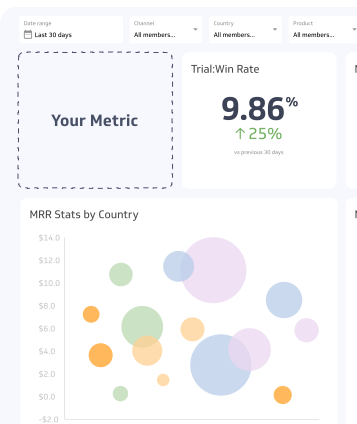
You can use a simple summary chart to effectively visualize your overall Cost Per Pixel data. Additionally, you can segment this data by campaign using a bar chart to study your performance in more detail.
Cost Per Pixel visualization examples
Cost Per Pixel

Bar Chart
Here's an example of how to visualize your Cost Per Pixel data in a bar chart to observe segmented data.
Summary Chart
Here's an example of how to visualize your current Cost Per Pixel data in comparison to a previous time period or date range.

Cost Per Pixel
Chart
Measuring Cost Per PixelMore about Cost Per Pixel
How tracking pixels work
A tracking pixel places a cookie on a user's browser when they interact with an ad or visit a page. That cookie sends behavioural data back to the ad server, which uses it to serve relevant ads to users who have shown interest in your product or category.
Because pixels target users with demonstrated intent rather than a broad audience, they typically produce higher conversion rates than untargeted campaigns. This makes Cost Per Pixel a useful measure of how efficiently that targeting is paying off.
Cost Per Pixel in practice
CPP is most closely associated with Meta (Facebook) advertising. On Meta, a pixel is required to:
- Enable dynamic ads that automatically show relevant products to users based on browsing behaviour
- Track conversions such as purchases, sign-ups, or page views
- Access retargeting tools that re-engage users who previously visited your site
- Measure Cost Per Conversion and other downstream metrics
A single Meta pixel is sufficient for most campaigns. Meta allows up to 100 pixels per ad account, but effective audience segmentation usually makes one pixel adequate for tracking goal conversions across a campaign.
Other platforms, including Google, LinkedIn, and Pinterest, use equivalent pixel or tag-based tracking mechanisms. The underlying principle is the same: the pixel captures user behaviour and enables targeted delivery.
What affects Cost Per Pixel
Several factors influence how much you pay per pixel-tracked conversion:
- Audience quality: Narrower, higher-intent audiences typically convert at higher rates, lowering CPP
- Ad creative: Relevant, compelling creative reduces cost by improving click-through and conversion rates
- Bidding strategy: Automated bidding can reduce CPP at scale, but may sacrifice control over audience targeting
- Pixel configuration: Poorly configured pixels may miss conversions or attribute them incorrectly, distorting CPP
- Competition: Higher advertiser competition in your category raises CPMs, which flows through to CPP
Common challenges
Pixel misfires: If a pixel fires on the wrong page or fails to fire on a conversion page, your CPP data becomes unreliable. Audit pixel placement regularly using platform diagnostic tools.
Attribution overlap: When multiple pixels or tracking tags are active, the same conversion may be counted more than once across platforms. Use a single source of truth for conversion reporting where possible.
Cookie and privacy changes: Browser-level cookie restrictions and privacy regulations (such as GDPR and iOS privacy updates) have reduced the reach of third-party pixel tracking. Server-side tracking and first-party data strategies are increasingly used to compensate for signal loss.
Vanity conversions: Not all pixel-tracked conversions are equal. A page view pixel and a purchase pixel both generate conversions, but they have very different business value. Define conversion events carefully and track CPP separately by event type.
How to improve Cost Per Pixel
- Refine your audience: Use pixel data to build lookalike audiences or exclude users who have already converted
- Test creative variations: A/B test ad copy and visuals to identify what drives the lowest CPP
- Prioritize high-value conversion events: Focus pixel tracking on actions that correlate with revenue, not just traffic
- Review attribution windows: Shorter attribution windows (e.g., 7-day click) give a more conservative, accurate picture of CPP
- Implement server-side tracking: Reduces data loss from browser restrictions and improves pixel match rates
CPP as part of a broader paid media framework
Cost Per Pixel is most useful when reviewed alongside related metrics. A low CPP is only meaningful if the conversions being tracked lead to downstream value.
| Metric | What it adds |
|---|---|
| Cost Per Conversion | Measures cost per completed goal, regardless of tracking method |
| Return on Ad Spend (ROAS) | Connects ad cost to revenue generated |
| Click-Through Rate (CTR) | Indicates ad relevance before the conversion stage |
| Cost Per Acquisition (CPA) | Tracks cost of acquiring a paying customer |
Reviewing CPP in context with these metrics helps distinguish efficient pixel targeting from low-quality conversions that inflate volume without driving real business outcomes.
Recommended resources related to Cost Per Pixel
How to use pixels to increase ad campaign conversion.Can you have multiple pixels in one account?Contributors



.jpg)