What is Email Unsubscribe Rate?
Email Unsubscribe Rate is the percentage of email recipients who opt out of a mailing list after receiving a campaign email, measured against total emails delivered. It signals how well your content, frequency, and targeting match subscriber expectations. A rising rate can damage sender reputation and reduce inbox placement over time.
Email Unsubscribe Rate Formula
How to calculate Email Unsubscribe Rate
A marketing team sends 1,000 emails, all successfully delivered. Ten recipients click unsubscribe.
Email Unsubscribe Rate = 10 / 1,000 = 1%
That result is well above the typical 0.1% benchmark, signalling a problem worth investigating — whether that's list quality, email frequency, or content relevance.
Start tracking your Email Unsubscribe Rate data
Use PowerMetrics, modern analytics platform, to monitor your data. Choose a service below to start tracking your Email Unsubscribe Rate instantly.


What is a good Email Unsubscribe Rate benchmark?
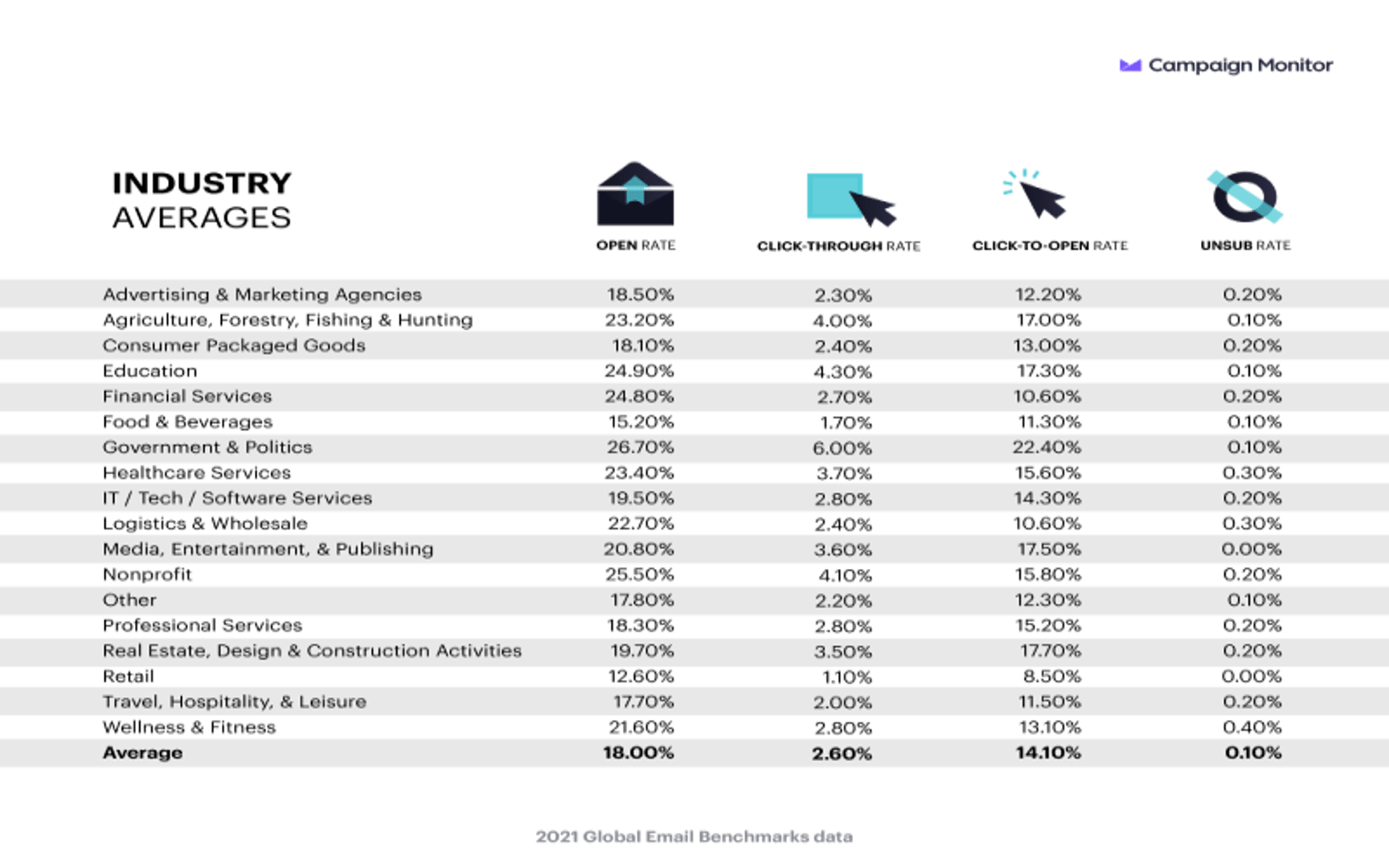
Industry benchmarks put the average Email Unsubscribe Rate at approximately 0.1% per campaign. Rates below 0.2% are generally considered healthy; rates consistently above 0.5% warrant a review of your email strategy. Benchmarks vary by industry, list size, and send frequency. Flag for review: The original source (Campaign Monitor, 2021) should be verified against current published data before publishing.
Email Unsubscribe Rate benchmarks
2021 Global Email Benchmarks
How to visualize Email Unsubscribe Rate?
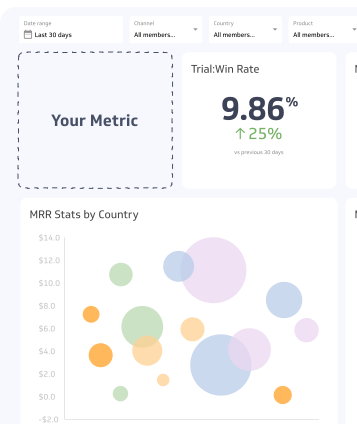
Although it's important to track Email Unsubscribe Rate, you get true value from this metric when you track other metrics such as Open Rate and Click-through Rate along with it on a dashboard. That being said, a summary chart is a simple and effective way to compare your current Email Unsubscribe Rate to the past to measure improvements.
Email Unsubscribe Rate visualization example

Summary Chart
Here's an example of how to visualize your current Email Unsubscribe Rate data in comparison to a previous time period or date range.
More about Email Unsubscribe Rate
Why Email Unsubscribe Rate matters
Unsubscribes are a direct signal from your audience. A rising rate tells you that recipients are losing interest, receiving emails too often, or finding the content irrelevant to their needs.
Beyond audience feedback, unsubscribe rates affect deliverability. Email service providers monitor engagement signals — including unsubscribes — to assess sender reputation. A high unsubscribe rate can reduce inbox placement over time, meaning future campaigns reach fewer people even when your list size stays the same.
Regulatory frameworks such as CAN-SPAM, CASL, and GDPR also require that recipients can opt out easily. Honouring unsubscribes promptly is both a legal obligation and a trust signal.
Common causes of high unsubscribe rates
Understanding why people unsubscribe helps you address the root cause rather than the symptom. The most common drivers include:
- Irrelevant content: Emails that don't match the subscriber's interests or stage in the customer journey
- Too much frequency: Sending too often overwhelms recipients and increases opt-out rates
- Misleading sign-up expectations: When what subscribers receive doesn't match what they signed up for
- Poor list hygiene: Sending to contacts who haven't engaged in a long time inflates unsubscribes
- No segmentation: Sending the same message to every contact regardless of behaviour or preference
How to reduce Email Unsubscribe Rate
Reducing unsubscribes starts with earning and maintaining subscriber trust. A few practices make a measurable difference.
Use a double opt-in process. Requiring new subscribers to confirm their email address filters out accidental sign-ups and ensures your list contains people who genuinely want to hear from you. This reduces early-stage unsubscribes.
Segment your list. Send targeted emails based on subscriber behaviour, purchase history, or preferences. A subscriber who downloaded a beginner's guide doesn't need the same email as a long-term customer. Segmentation improves relevance and reduces opt-outs.
Control send frequency. More emails don't always mean more engagement. Test different cadences and let subscriber behaviour guide your schedule. Consider giving subscribers the option to choose how often they hear from you.
Review content quality. Each email should deliver clear value — whether that's useful information, an exclusive offer, or a timely update. If an email doesn't have a clear purpose for the recipient, reconsider sending it.
Monitor unsubscribes by campaign. Don't only track aggregate rates. Reviewing which specific campaigns drive the most opt-outs reveals patterns in content type, send time, or subject line that you can act on.
Email Unsubscribe Rate vs. related metrics
Email Unsubscribe Rate is one signal among several. Reviewing it alongside related metrics gives a fuller picture of list health.
| Metric | What it measures | How it relates |
|---|---|---|
| Email Unsubscribe Rate | Opt-outs per email delivered | Direct signal of subscriber dissatisfaction |
| Email Open Rate | Opens per email delivered | Low open rates can precede rising unsubscribes |
| Email Click-Through Rate | Clicks per email delivered | Low CTR with high unsubscribes suggests content mismatch |
| Spam Complaint Rate | Spam reports per email delivered | A more severe signal; damages sender reputation faster |
| List Growth Rate | Net new subscribers over time | Unsubscribes offset growth; both matter for list health |
A low unsubscribe rate paired with low open and click rates may indicate that subscribers are disengaging passively rather than opting out — which can be just as damaging to deliverability over time.