What is Email Clicks?
Email Clicks is a count of the total number of times any link in an email was clicked by recipients. Marketers use Email Clicks to calculate key performance metrics like Click-Through Rate (CTR) and Click-to-Open Rate (CTOR), and to compare engagement across campaigns.
Email Clicks Formula
How to calculate Email Clicks
Over one month, you send two newsletters to your subscriber list. Each email contains a link to your product page and several links to blog posts.
Email 1: 300 clicks. Email 2: 650 clicks.
Formula: Count(Email Clicks)
Total Email Clicks for the month: 300 + 650 = 950.
The second email generated more than twice the clicks of the first. To understand why, calculate CTR and CTOR for each send. Those metrics account for list size and open rate, giving you a more accurate picture of what drove the difference.
Start tracking your Email Clicks data
Use PowerMetrics, modern analytics platform, to monitor your data. Choose a service below to start tracking your Email Clicks instantly.

What is a good Email Clicks benchmark?
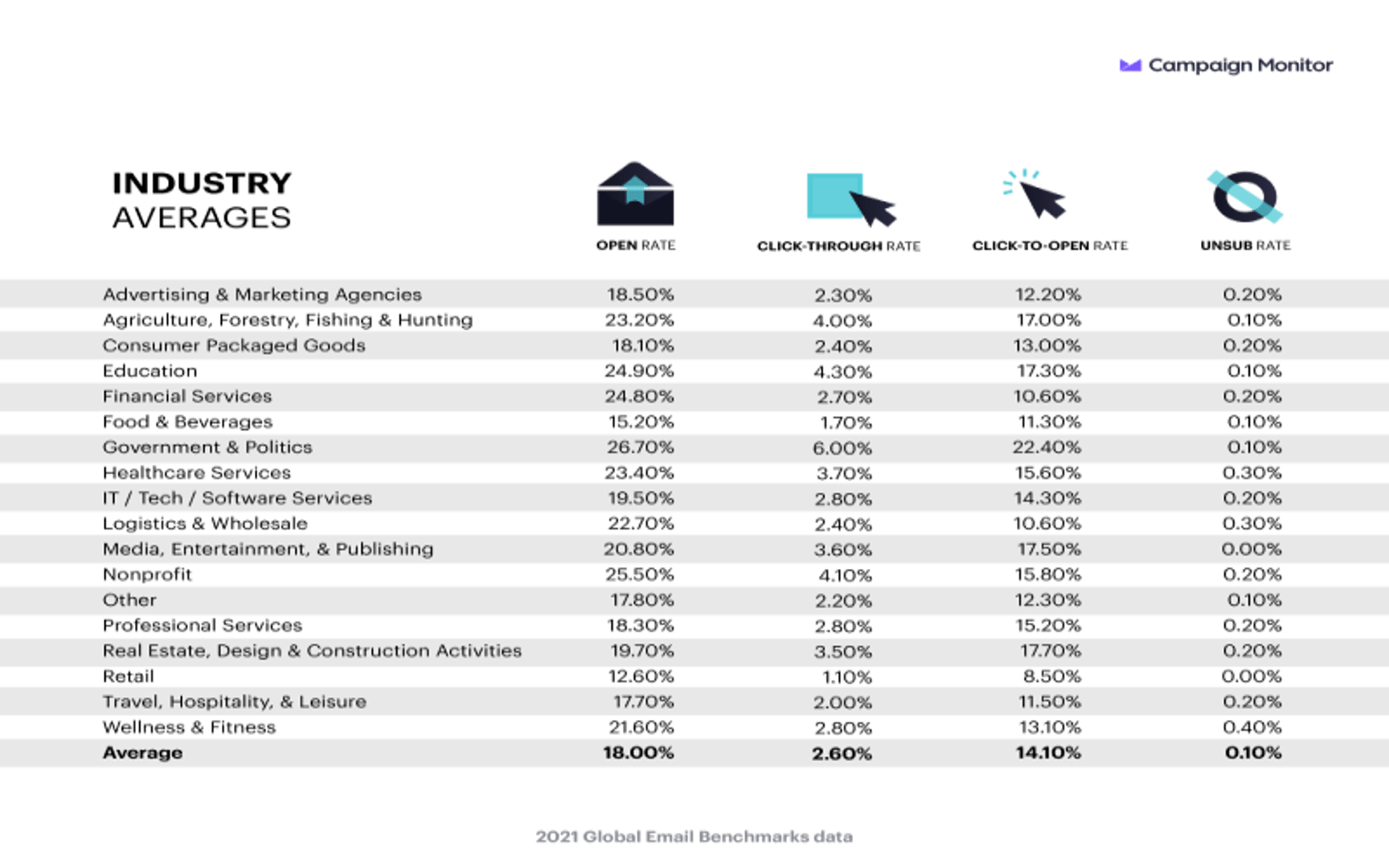
It is difficult to benchmark email click volume. Instead, you can compare your email CTOR, CTR, and Open Rates to the global benchmark:
Email Clicks benchmarks
2021 Global Email Benchmarks
How to visualize Email Clicks?
There are two ways to optimally visualize your Email Clicks: either in a summary chart to know the overall number, or in a line chart to observe changes in trend over time. Either way, it is absolutely necessary to measure Clicks alongside other email metrics to get a complete picture of your campaign's performance.
Email Clicks visualization examples

Summary Chart
Here's an example of how to visualize your current Email Clicks data in comparison to a previous time period or date range.
Email Clicks
Line Chart
Here's an example of how to visualize your Email Clicks data in a line chart over time.
More about Email Clicks
An email click is recorded when a recipient clicks any link inside your email. Common link types include:
- Product or homepage links that drive traffic to key landing pages
- Blog or article links that support content marketing goals
- Source links that reference external data or research cited in the email
- Store or offer links that support promotional campaigns
Each click on each link is counted. If one recipient clicks three links, that registers as three Email Clicks.
Email Clicks as a building block metric
Email Clicks on its own is a volume metric. It tells you how many clicks happened, but not how efficient your email was at generating them. For that reason, it functions best as an input to other calculations:
| Metric | What it adds |
|---|---|
| Click-Through Rate (CTR) | Clicks as a share of total emails delivered |
| Click-to-Open Rate (CTOR) | Clicks as a share of emails opened |
| Email Open Rate | Context for whether low clicks reflect a delivery or content problem |
Tracking Email Clicks alongside Emails Delivered and Open Rate helps you isolate where drop-off occurs in the engagement funnel.
Monitoring trends over time
Email Clicks is sometimes described as a vanity metric because volume alone does not reflect campaign quality. A large list will produce more clicks than a small one, regardless of content quality.
That said, monitoring Email Clicks over time is still worthwhile. A sustained decline in click volume, even when list size holds steady, is an early signal that content relevance or link placement may need attention. Catching that trend early gives you time to investigate and adjust before it affects conversion metrics.
What to do when Email Clicks decline
If Email Clicks are falling, consider these areas:
- Link relevance: Are the links in your emails directly connected to the content around them? Misaligned links reduce clicks.
- Call to action clarity: Each email should include at least one clear, specific call to action. Vague prompts reduce engagement.
- Link placement: Links buried at the bottom of long emails get fewer clicks. Test placement higher in the email body.
- Audience segmentation: A single email sent to your full list may underperform compared to segmented sends tailored to specific subscriber interests.
Email Clicks Frequently Asked Questions
How can I increase Email Clicks?
Here are the top 3 tips to increase Email Clicks:
- Be very selective with the links you feature in your email. Choose links that are relevant to your business objectives and the copy where the link is embedded, and make sure to link to reputable sites.
- Craft compelling copy and email template design
- Monitor other metrics that might be lowering your clicks. For example, if your open rate is low, your clicks will automatically be low as well in most cases. It helps to monitor all your email marketing metrics in one view with a free analytics tool such as Klipfolio PowerMetrics.