What is Email Ignore Rate?
Email Ignore Rate is the percentage of sent emails that recipients never open, often because they delete them from the inbox unread. A high rate suggests your subject lines, timing, or targeting aren't earning attention, or that inbox providers are filtering your messages as spam. Tracking it shows whether your message and call-to-action reach the people you want to reach, and helps you decide whether to clean your list, change your sending cadence, or rewrite subject lines.
Email Ignore Rate Formula
How to calculate Email Ignore Rate
Say you send a promotional email to 1,000 addresses on your list, and 800 recipients open it.
- Emails sent: 1,000
- Emails opened: 800
- Unopened emails: 1,000 - 800 = 200
- Email Ignore Rate: 200 / 1,000 x 100 = 20%
One in five recipients never opened the email. If your last campaign had a 12% rate, this one performed worse, and the subject line or send time is a good place to start looking.
Start tracking your Email Ignore Rate data
Use PowerMetrics, modern analytics platform, to monitor your data. Choose a service below to start tracking your Email Ignore Rate instantly.


How to visualize Email Ignore Rate?
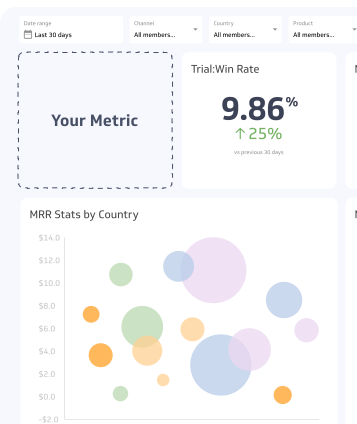
When tracking Email Ignore Rate, your aim should be to display your current percentage so that you always have this number on hand and can easily monitor your ignore rates. A summary chart can help you achieve this objective, while also helping compare the current Email Ignore Rate to a previous time period. Your goal should be to decrease Email Ignore Rate over time.
Email Ignore Rate visualization example

Summary Chart
Here's an example of how to visualize your current Email Ignore Rate data in comparison to a previous time period or date range.
More about Email Ignore Rate
Some emails will always go unread, so a rate above zero is normal. The useful signal is the trend and how the rate differs by segment, campaign, and send time.
How to interpret Email Ignore Rate
A lower rate means more of your list is opening what you send. A rising rate means attention is slipping, and the cause usually falls into one of three groups.
| Pattern | Likely cause | First thing to check |
|---|---|---|
| Rate rises across all campaigns | List fatigue or declining deliverability | Send frequency and spam placement |
| Rate is high for one campaign | Weak subject line or poor timing | Subject line and send time |
| Rate is high for one segment | Poor targeting or an outdated segment | Who is on that segment and why |
Compare your rate against your own history first. Results vary widely by industry, list quality, and how each tool counts opens, so your trend is more reliable than an outside number.
What drives Email Ignore Rate up or down
- List hygiene: Addresses that bounce, belong to inactive users, or were never engaged inflate the rate. Remove hard bounces and review contacts who haven't opened in several months.
- Targeting: Emails sent to people who don't need the offer get ignored. Segment by interest, behaviour, or lifecycle stage.
- Send frequency: Too many emails train people to skip them. Too few, and recipients forget who you are.
- Subject line and sender name: These are the only things most recipients see before deciding. Clear, specific subject lines and a recognizable sender name tend to earn more opens.
- Send time: Emails that arrive when your audience is busy or offline get buried under newer messages.
- Deliverability: If inbox providers route your emails to spam or promotions tabs, people never see them, and your rate climbs.
Why Email Ignore Rate matters
A high rate means your message and call-to-action aren't reaching your audience. When recipients repeatedly ignore or delete your emails, inbox providers read that as low engagement and may start filtering your messages as spam. Once that happens, even your engaged contacts may stop seeing your emails.
How to lower your Email Ignore Rate
- Clean your list. Remove addresses that cause Email Bounces and contacts who have been inactive for a set period, such as six months. Consider a re-engagement email first.
- Refine your audience. Send fewer emails to more relevant segments instead of one message to everyone.
- Adjust frequency. Test sending less often to see whether the rate drops without hurting results.
- Test subject lines. Run A/B tests that change one element at a time, such as length, specificity, or a question versus a statement.
- Test send times. Compare the same campaign sent at different days and hours.
- Check authentication. Confirm your domain uses SPF, DKIM, and DMARC so inbox providers trust your emails.
Common pitfalls and misreadings
Open tracking is imperfect. Apple Mail Privacy Protection, introduced in 2021, preloads emails for many Apple Mail users, which can register as an open even when the person never read the message. Other privacy tools and image blocking cause errors in the other direction. Because Email Ignore Rate depends on opens, it may understate how many people ignore your emails.
Unopened does not always mean ignored. Someone may read your email in a preview pane, or act on the subject line without opening. The name suggests intent that the data can't confirm.
Sent versus delivered. Using sent emails as the denominator mixes bounces into the rate. If your bounce rate changes, your Email Ignore Rate will move even though recipient behaviour hasn't.
Averages hide segments. A steady overall rate can mask a loyal segment that opens everything and a large inactive segment that opens nothing. Break the rate down by segment before acting.
Because of the open-tracking problem, pair this metric with clicks, replies, and conversions. These actions are harder to inflate and show whether the email did its job.
Related metrics
- Email Open Rate: The mirror image of Email Ignore Rate. Together they account for every email sent.
- Email Bounce Rate: The share of emails that never reach the inbox. Bounces affect how you calculate Email Ignore Rate and can damage your sender reputation.
- Email Click Rate: Shows whether opened emails lead to action.
- Unsubscribe Rate: Shows how many recipients chose to leave your list instead of ignoring you.
Email Ignore Rate Frequently Asked Questions
Is Email Ignore Rate the same as 100% minus Email Open Rate?
Yes, when both metrics use the same denominator. If Email Open Rate is 25% of sent emails, Email Ignore Rate is 75%.
What is a good Email Ignore Rate?
It depends on your industry, list quality, and how your tool counts opens. Compare your rate against your own past campaigns and against segments of your list before using an outside figure.