A LinkedIn ad campaign runs two ads. The first ad receives 200 reactions, 10 comments, and 100 clicks to the landing page. The second ad generates 300 reactions, 5 comments, 5 shares, 50 clicks to the LinkedIn page, and 50 follow clicks. Campaign Engagement = (200 + 10 + 100) + (300 + 5 + 5 + 50 + 50) = 720 total interactions. That number tells you how much the campaign moved people to act, across every touchpoint.
Campaign Engagement
Last updated: Aug 26, 2026
What is Campaign Engagement?
Campaign Engagement is the total number of interactions an ad campaign receives, including clicks, reactions, comments, and shares across all ads in the campaign.
Campaign Engagement Formula
ƒ Sum(Total Post Interactions) + Sum(Campaign Clicks)
How to calculate Campaign Engagement
Start tracking your Campaign Engagement data
Use PowerMetrics, modern analytics platform, to monitor your data. Choose a service below to start tracking your Campaign Engagement instantly.


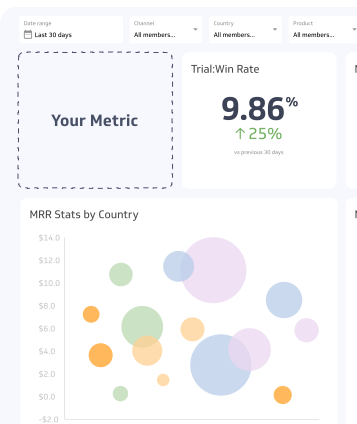
How to visualize Campaign Engagement?
To visualize your Campaign Engagement in a dashboard, you can use a summary chart to display the current value or a table to segment reactions by campaign. However, it's important to track other metrics such as engagement rate and click rate along with Campaign Engagement to get a better understanding of your campaign performance.
Campaign Engagement visualization example

Summary Chart
Here's an example of how to visualize your current Campaign Engagement data in comparison to a previous time period or date range.

Campaign Engagement
Chart
Measuring Campaign EngagementMore about Campaign Engagement
Campaign Engagement measures the breadth of audience response to a paid campaign, most commonly on social platforms like LinkedIn, Facebook, and Instagram. It captures every recorded interaction: post reactions, comments, shares, follow clicks, and campaign clicks to landing pages or profile pages.
A high Campaign Engagement total signals that the campaign content resonated enough to prompt action. A low total, relative to impressions or reach, suggests the creative or targeting needs adjustment.
Because Campaign Engagement is a sum rather than a rate, it grows with campaign scale. A larger budget reaching more people will naturally produce a higher raw total. Use it alongside rate-based metrics (such as engagement rate or click-through rate) to separate volume from efficiency.
Not all interactions carry equal weight
Campaign Engagement treats every interaction as equal in the formula, but that does not mean every interaction has equal business value.
A comment takes more effort and intent than a reaction. A click to a landing page is closer to a conversion than a follow click. Shares extend reach beyond the paid audience, which reactions do not.
Consider building an internal weighting system alongside the raw total. For example:
| Interaction type | Relative value |
|---|---|
| Landing page click | High |
| Share | High |
| Comment | Medium |
| Follow click | Medium |
| Reaction | Low |
This does not replace Campaign Engagement as a metric; it supplements it. The raw total remains useful for trend tracking and cross-campaign comparison. The weighted view helps you assess campaign quality, not just volume.
Tracking Campaign Engagement over time
Single-campaign snapshots are limited in what they reveal. The metric becomes more useful when tracked consistently across campaigns, so you can answer questions like:
Is engagement improving? Compare campaigns with similar budgets and targeting to isolate the effect of creative changes.
Which formats drive more interaction? Video, carousel, and static image ads typically produce different engagement profiles on the same platform.
Does engagement correlate with downstream results? If high-engagement campaigns also produce more conversions, Campaign Engagement is a reliable leading indicator for that audience. If not, the metric may be capturing surface interest without purchase intent.
Platforms report Campaign Engagement differently. LinkedIn counts reactions, comments, shares, clicks, and follows. Facebook and Instagram group interactions under "post engagement" with slightly different definitions. When comparing across platforms, confirm that the interaction types included are consistent, or segment by platform.
Common pitfalls
Treating total engagement as a success signal in isolation. A campaign with 5,000 interactions but 500,000 impressions and zero conversions is underperforming, even if the raw number looks strong. Pair Campaign Engagement with engagement rate and conversion metrics before drawing conclusions.
Ignoring negative interactions. Some platforms count "hide ad" or "report ad" actions separately. A campaign generating high engagement but also high negative feedback may be reaching the wrong audience or using messaging that feels intrusive.
Comparing campaigns with different budgets or durations. Larger spend and longer run times produce more interactions by default. Normalize comparisons by engagement per dollar spent or engagement per 1,000 impressions when evaluating creative performance across campaigns.
Recommended resources related to Campaign Engagement
This is an in-depth look at how to analyze your ad campaign on LinkedIn.Contributor